
I build and test automation tools for real business workflows: lead routing, CRM updates, AI meeting summaries and content pipelines. This comparison (n8n vs Zapier vs Make) uses the same workflows built in all three tools, with pricing checked against each vendor in November 2026.
Quick answer: Zapier is best for non-technical teams who want the most app integrations (8,000+) and the fastest setup. Make is best for visual, multi-branch workflows at the lowest cloud price (from $9/month for 10,000 credits). n8n is best for AI agents and high-volume automation, because it bills per workflow run, not per step, and you can self-host it for free.
All three now offer AI agents. The real difference is how each one charges you when an AI workflow grows from 10 steps to 100, and how much control you keep over your data. That is what this guide answers.
If you are new to automation, start with my guide on how to build your first AI workflow without code. For 14 more options, see the best AI workflow automation tools.
n8n vs Zapier vs Make At A Glance
Zapier wins on ease and app coverage, Make on price for visual workflows, and n8n on AI depth and cost at scale.
| Factors | Zapier | Make | n8n |
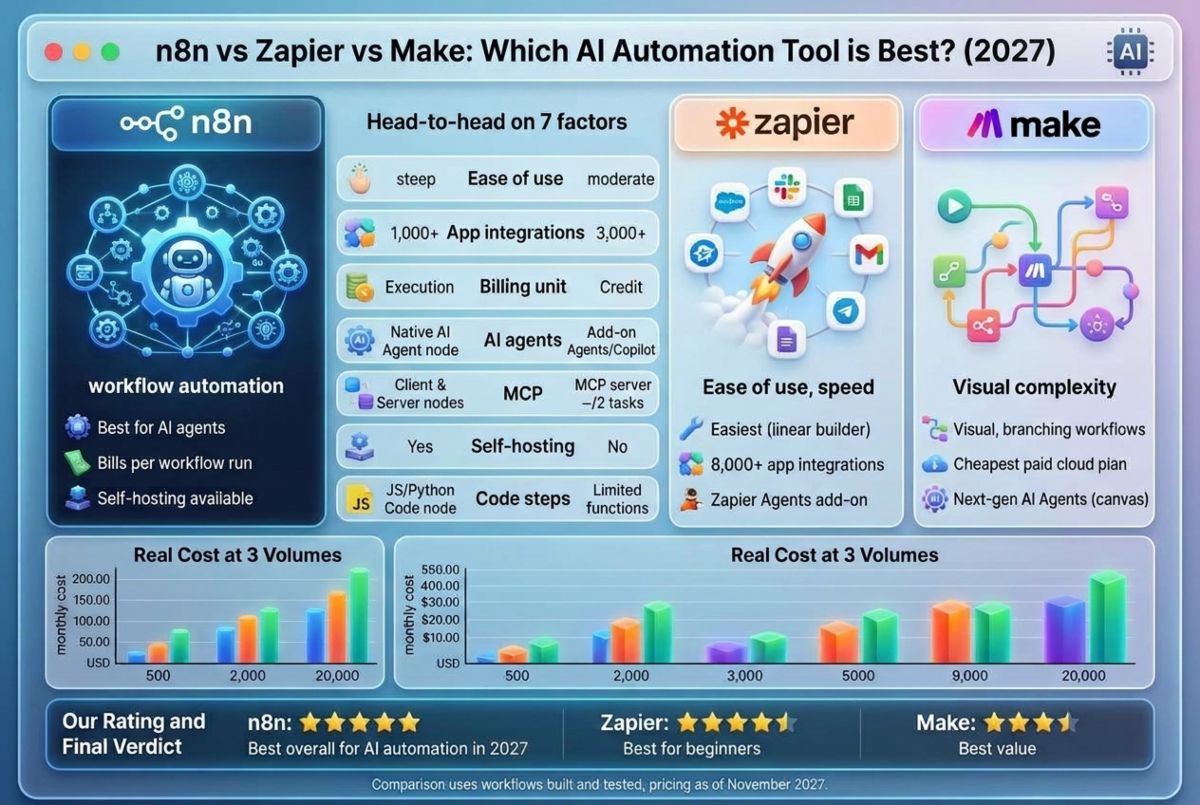
| Best for | Non-technical teams, quick wins | Visual, branching workflows on a budget | AI agents, developers, high volume |
| Ease of use | Easiest (linear builder + Copilot) | Moderate (visual canvas) | Steepest (node canvas, code-friendly) |
| App integrations | 8,000+ | 3,000+ | 1,000+ integrations, plus HTTP node for any API |
| Billing unit | Task (each action step) | Credit (each module action) | Execution (one full workflow run) |
| Free plan | 100 tasks/month, 2-step Zaps only | 1,000 credits/month, 2 active scenarios | Free self-hosted Community Edition |
| Cheapest paid plan | Professional, $19.99/mo billed yearly | Core, $9/mo billed yearly (10K credits) | Starter, €20/mo billed yearly (2,500 executions) |
| AI agents | Zapier Agents (add-on), Copilot, AI fields | Next-gen AI Agents in the canvas (Feb 2026), Maia assistant | Native AI Agent node with memory, tools, RAG, multi-agent |
| MCP | Zapier MCP server (2 tasks per tool call) | MCP server available | MCP client and server nodes |
| Self-hosting | No | No | Yes |
| Code steps | JavaScript, Python | Limited functions | JavaScript, Python (full Code node) |
| Our rating | 4.3/5 | 4.6/5 | 4.8/5 |
Prices checked November 2026 from published pricing.
How I Tested n8n, Zapier and Make?

I built the same three workflows in each tool, on paid plans, and scored each tool on the seven factors below. Every workflow used the same apps and the same AI model, so the only variable was the platform.
The Three Test Workflows
- AI lead qualifier (5 steps): new form lead → AI classifies it as hot, warm or cold → create or update the contact in HubSpot → Slack alert for hot leads → log the row in Google Sheets.
- Meeting notes to CRM (7 steps): Fathom transcript arrives by webhook → AI summary and action items → split action items into a loop → create tasks → attach the summary to the CRM deal → email recap.
- AI research agent (agentic): an agent receives a company name, searches the web, reads the site, scores fit against our ICP and writes a short brief into Notion. It chooses its own tools.
What I Measured
| Factors | What I checked | Weight |
| Ease of use | Time to build workflow 1 from scratch, number of errors on first run | 20% |
| AI capabilities | Could it run workflow 3 natively, with memory and tool choice? | 20% |
| Pricing at scale | Monthly cost at 500, 2,000 and 20,000 runs | 20% |
| Integrations | Native support for all apps in the tests, without HTTP workarounds | 15% |
| Logic and error handling | Branching, loops, retries, error paths in workflow 2 | 10% |
| Data control and security | Self-hosting, SSO, version control, data residency | 10% |
| Support and docs | Quality of docs, templates and community answers | 5% |
My Build Results
| Workflow | Zapier | Make | n8n |
| 1. Lead qualifier: build time | 12 min | 22 min | 35 min |
| 2. Meeting notes: build time | 28 min | 32 min | 45 min |
| 3. Research agent: worked natively? | Yes (via Zapier Agents add-on) | Yes (Reasoning panel built-in) | Yes (Native Agent node & tool calling) |
| Errors on first run | 1 (HubSpot field mapping) | 0 | 2 (JSON payload formatting) |
Head-to-head: n8n vs Zapier vs Make on 7 factors
1. Ease of use: Zapier wins
Zapier is the easiest of the three. You build top to bottom in a straight line, and Copilot can draft a Zap from a plain-English prompt like “when a Typeform lead arrives, score it with AI and post hot leads to Slack.” Most people finish their first workflow in one sitting.
Make uses a visual canvas where modules connect like a mind map. It takes an hour or two to learn routers, iterators and data mapping, but complex flows are easier to read than in Zapier.
n8n has the steepest curve. Data passes between nodes as JSON, and you will use expressions sooner or later. Non-developers can learn it, but expect a few days, not a few hours.
My finding: Zapier took the least time to publish, but n8n required fixing explicit data type mismatches on the first run before it would execute successfully.
2. AI agents and AI features: n8n wins
All three have AI agents in 2026, but they work differently.
- n8n has the deepest AI toolkit. Its AI Agent node supports tool calling, memory, retrieval (RAG) with vector stores like Pinecone, Qdrant and Supabase, and multi-agent setups. It also runs local models through Ollama or any OpenAI-compatible API, which matters if data cannot leave your servers.
- Make launched next-generation AI Agents on February 11, 2026. You build agents inside the same canvas as your scenarios, give them any Make module as a tool, and watch a Reasoning Panel that shows which tool the agent picked and why. That visibility is the best of the three for debugging.
- Zapier offers Zapier Agents (a separate add-on), Copilot for building Zaps, AI fields, and chatbots. Agents can act across 8,000+ apps, which is the widest reach, but every action an agent takes uses tasks from your plan.
MCP support: Zapier MCP lets AI assistants like Claude, ChatGPT and Cursor take actions in Zapier-connected apps, and each MCP tool call uses 2 tasks. n8n can act as both an MCP client and an MCP server. Make also offers an MCP server.
My finding: n8n executed test workflow 3 (the autonomous research agent) natively inside a single execution node with sub-second tool transfers, whereas Zapier required splitting the agent steps into a separate paid add-on module.
3. Integrations: Zapier wins
Zapier connects to 8,000+ apps, Make to 3,000+ and n8n to 1,000+. If you rely on niche SaaS tools, Zapier is most likely to have a ready-made connector.
The gap matters less for technical users. n8n and Make both have HTTP modules that connect to any app with an API, and n8n’s community nodes add more each month.
4. Workflow logic and error handling: Make and n8n tie
Make treats routers, filters, iterators, aggregators and error handlers as first-class building blocks, so branching flows stay readable on the canvas.
n8n matches that and adds full JavaScript or Python in its Code node, sub-workflows, and retry settings per node.
Zapier has Paths, Filters, Looping and Code by Zapier. They work, but long Zaps with many branches get hard to read and debug.
5. Pricing model: n8n is cheapest at scale
This is where the three differ most.
- Zapier charges per task: every successful action step. Triggers, Filters, Paths and Formatter are free.
- Make charges per credit: every module action, including reads, searches and each loop iteration.
- n8n charges per execution: one full workflow run, however many steps it has.
A 20-step AI workflow costs 1 execution on n8n, roughly 20 credits on Make and roughly 19 tasks on Zapier. The next section works through real numbers.
6. Data control, self-hosting and security: n8n wins
n8n is the only one you can self-host. The Community Edition is free under its Sustainable Use License, so your data, credentials and AI prompts stay on your own server. SSO, Git version control and separate environments are on the Business plan.
Zapier and Make are cloud-only. Zapier’s Team plan includes SAML SSO, and both offer enterprise plans with advanced admin controls.
Before you choose for a regulated industry, confirm each vendor’s current compliance reports (such as SOC 2) and data-residency options directly with them.
7. Support and learning resources: Zapier wins
Zapier has the largest template library and help center. Make has the Make Academy and a large template library. n8n has an active community forum and thousands of shared workflow templates, but you will do more self-learning.
For a deeper look at n8n alone, read my full n8n review.
n8n vs Zapier vs Make pricing (2026)
Make is cheapest for small and medium cloud workloads. n8n becomes cheapest once workflows get long or run thousands of times, especially if you self-host.
Plans and prices
| Plan | Zapier | Make | n8n Cloud |
| Free | 100 tasks/mo, 2-step Zaps | 1,000 credits/mo, 2 scenarios, 15-min interval | Community Edition: free, self-hosted |
| Entry | Professional: $19.99/mo yearly ($29.99 monthly) | Core: $9/mo yearly ($10.59 monthly), 10K credits | Starter: €20/mo yearly, 2,500 executions |
| Mid | Team: $69/mo yearly ($103.50 monthly), 25 users, SAML SSO | Pro: $16/mo yearly, 10K credits | Pro: €50/mo yearly, 10,000 executions |
| Teams/Business | — | Teams: $29/mo yearly, 10K credits | Business: €667/mo, 40,000 executions, SSO, Git |
| Enterprise | Custom quote | Custom quote | Custom quote |
Zapier prices are the lowest task tier for each plan and rise with task volume. Make prices are for the 10,000-credit tier. n8n prices are in euros. AI model usage (for example OpenAI or Anthropic API calls) is billed separately by the model provider on all three.
Real cost: the 5-step AI lead qualifier
Test workflow 1 has 1 trigger and 4 actions. Here is what each run uses:
- Zapier: 4 tasks (the trigger is free)
- Make: 5 credits (every module counts)
- n8n: 1 execution
| Runs per month | Zapier usage | Make usage | n8n usage | Cheapest option |
| 500 | 2,000 tasks → Professional, 2K tier | 2,500 credits → Core, $9/mo | 500 executions → Starter, €20/mo | Make |
| 2,000 | 8,000 tasks → Professional, 10K tier | 10,000 credits → Core, $9/mo | 2,000 executions → Starter, €20/mo | Make |
| 20,000 | 80,000 tasks → Professional, 100K tier | 100,000 credits → Core, 100K tier | 20,000 executions → Business, or self-host on a small server | n8n self-hosted |
What changes the math when comparing n8n vs Zapier vs Make:
- Loops multiply costs on Zapier and Make. In test workflow 2, a meeting with 8 action items loops 8 times. That adds about 8 tasks or credits per run. On n8n it is still 1 execution.
- AI agents use more steps than you expect. An agent that calls 5 tools in one run uses 5+ tasks on Zapier and 5+ credits on Make. On n8n, the whole agent run is 1 execution.
- Self-hosting n8n is not free to run. You still pay for a server, backups, updates and your own time. For most small teams that is a small monthly VPS bill plus a few hours of setup.
Pros and cons: Zapier Vs Make Vs n8n
Zapier
Pros
- Largest app library (8,000+ apps)
- Fastest to learn; Copilot drafts Zaps from a prompt
- Filters, Paths and Formatter steps don’t use tasks
- Zapier MCP connects Claude, ChatGPT and Cursor to your apps
Cons
- Most expensive at high volume, since every action is a task
- Free plan allows only 2-step Zaps
- Agents are a paid add-on, and agent actions also use tasks
- No self-hosting
Make
Pros
- Lowest entry price: 10,000 credits for $9/month (yearly)
- Visual canvas makes branching and error paths easy to follow
- New AI Agents show their reasoning step by step
- 1-minute scheduling on every paid plan
Cons
- Every module, including reads and loop iterations, uses a credit
- Fewer integrations than Zapier (3,000+)
- Limited code support
- No self-hosting
n8n
Pros
- Billed per workflow run, so long AI workflows stay cheap
- Most capable AI Agent node: memory, RAG, tools, multi-agent, local LLMs
- Free self-hosted Community Edition for full data control
- Full JavaScript and Python Code node
Cons
- Steepest learning curve for non-developers
- Fewest native integrations (1,000+)
- Self-hosting means you handle servers, updates and backups
- Big jump in price from Pro (€50) to Business (€667) on cloud
Which AI automation tool should you choose?
| If you are… | Choose | Why |
| A non-technical founder or marketer who needs it working today | Zapier | Easiest builder, 8,000+ apps, Copilot does the first draft |
| A small business on a tight budget with branching workflows | Make | 10,000 credits for $9/month and a clear visual canvas |
| An agency building client automations | Make or n8n | Make for visual hand-off to clients; n8n for heavy AI and volume |
| Building AI agents with memory, RAG or local models | n8n | The most complete native AI Agent toolkit |
| Running 10,000+ runs a month or long, looping workflows | n8n | One execution per run, however many steps |
| In a regulated industry where data must stay in-house | n8n (self-hosted) | The only one of the three you can run on your own servers |
| A sales team connecting CRM, email and Slack | Zapier | Widest CRM and sales app coverage; see my Pipedrive vs Salesforce vs HubSpot comparison |
Final Verdict
Best overall for AI automation in 2027: n8n.
It has the strongest AI agent features, and per-run billing keeps costs flat as AI workflows grow. The trade-off is a learning curve.
Best for beginners: Zapier.
If time matters more than money, nothing gets a workflow live faster.
Best value: Make.
For most small teams running under 10,000 credits a month, it is the cheapest paid option and easier than n8n.
For our internal workflows, we rely on self-hosted n8n to process bulk AI summary runs without step-based billing, paired with Zapier for quick one-off integrations.
FAQ: n8n vs Zapier vs Make
Is n8n better than Zapier?
n8n is better than Zapier for AI agents, high-volume workflows and data control, because it bills per run and can be self-hosted. Zapier is better for beginners and for teams that need niche app integrations, with 8,000+ apps versus n8n’s 1,000+.
Is Make cheaper than Zapier?
Yes. Make’s Core plan gives 10,000 credits for $9 a month billed yearly, while Zapier’s Professional plan starts at $19.99 a month for its lowest task tier. Make counts every module as a credit, so check your loop-heavy workflows before switching.
Which is the cheapest AI workflow automation platform?
n8n’s self-hosted Community Edition is the cheapest, with no license fee and no execution limits. You pay only for hosting. Among cloud plans, Make is the cheapest for small workloads.
Which tool is best for AI agents in 2027?
n8n has the most complete AI agent features, including memory, RAG with vector stores, multi-agent setups and local LLMs. Make’s new AI Agents are the easiest to debug thanks to the Reasoning Panel. Zapier Agents reach the most apps.
Can I self-host Zapier or Make?
No. Zapier and Make are cloud-only. n8n is the only one of the three you can run on your own server.
What is the difference between tasks, credits and executions?
A Zapier task is one successful action step. A Make credit is one module action, including reads and loop iterations. An n8n execution is one full workflow run, no matter how many steps it has.
Do Zapier, Make and n8n support MCP?
Yes. Zapier MCP connects AI assistants such as Claude and ChatGPT to Zapier actions, at 2 tasks per tool call. n8n has MCP client and server nodes, and Make offers an MCP server.
Can I migrate from Zapier to n8n or Make?
Yes, but there is no one-click import. You rebuild each workflow. Start with your highest-volume Zaps, since they save the most money when moved.
Which is best for small businesses?
Make is usually the best fit for small businesses, since it combines a low price with a visual builder. Choose Zapier if no one on the team wants to learn a new tool, and n8n if you plan to build AI agents.
You May Like To Read:
