

Lets be honest: nobody wants to go in a meeting as the designated scribe. We have been all there, trying to catch a brilliant idea while simultaneously taking meeting notes who promised to handle the tasks and follow up emails. By the end of the meeting, you are left with messy documents and a headache and the realization that you were not truly present for the conversation.
This is exactly why AI meeting note takers have exploded in popularity in 2026. These tools have evolved from simple transcription bots to genuine workflow assistants that lets you focus on the people in the room (or on the screen) while they handle the documentations.
If you have started looking for the best solution, you have likely run into the biggest names in the game: Supernormal and Otter.ai.
One is modern and favorite for the teams who want invisible recording and perfectly formatted notes while the other one is veteran powerhouse for its live, scrolling transcripts. In this comparison, we are going to vet both tools head-to-head, analyzing their accuracy, bot presence, and 2026 features to help you decide which AI note-taker is best for you.
Supernormal Vs Otter.ai: Head-to-Head Comparison
Supernormal AI Notetaker: Specs & Pricing
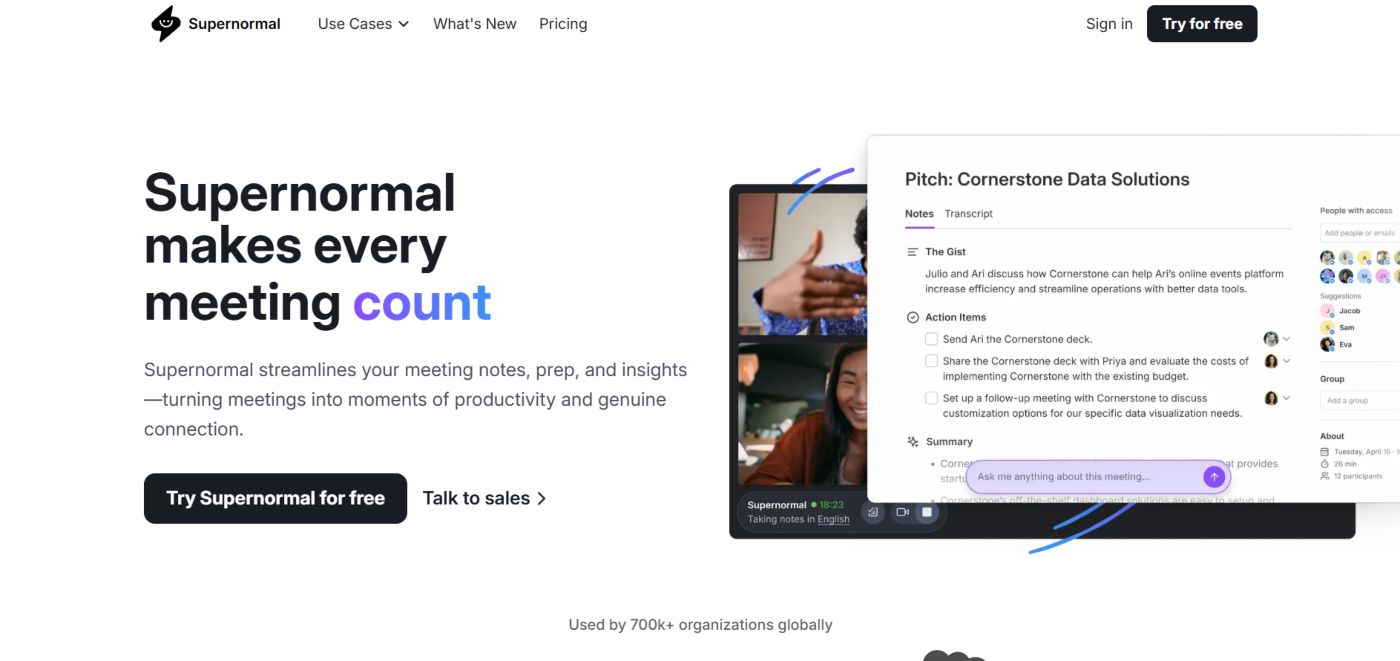
In 2026, Supernormal has rebranded itself an AI agent for agencies. While it started a a meeting recorded and now it uses your meeting context to perform actual work like creating presentation, spreadsheets and even research reports based on what was discussed.
It is widely considered as the polished tool for teams who want high quality and professional documentation without touching a transcript.
Here are some key specifications and features of Supernormal worth mentioning:
- Recording Method: It offers a Bot-less Desktop App (means no more visible bots in the room), a Chrome Extension or a traditional meeting bot.
- Language Support: It supports up to 60+ languages with automatic dialect detection.
- AI Engine: Supernormal uses a hybrid of GPT-4o and proprietary models to generate “The Gist” (concise summaries).
- Integrations: It can easily be synced with HubSpot, Salesforce, Slack, Notion, Asana and Google Drive.
- Security: It is SOC 2 Type II certified with AES-256 Encryption.
What I Like About Supernormal (Pros)
Bot-Free Privacy
One of the best thing about this tool is that its desktop quietly record meetings without joining the meeting as a bot. This is a massive win for privacy-sensitive clients.
Template Drive Notes
It does not just summarize, it follows specific templates i.e. client kickoff, board meeting one-one-one, so your notes are always perfectly structured.
Multilingual Mystery
The good thing we like the most is that it can handle mixed-language meetings better than almost any competitor in 2026.
Zero-Edit Summaries
The write style of this tool is very human and professional so you rarely need to fix the output before sending it to a client.
What I Don’t Like About Supernormal (Cons)
The Edit Problem
It is difficult to edit the final transcript (word for word) in some tiers as you are forced to rely on AI’s interpretation.
No Live Transcript
Unlike Otter.ai, you cannot see the words appearing in real-time. You have to wait until the meeting ends to see the results.
Pricing Barrier
In 2026, Supernormal has moved away from a generous “forever free” mode for businesses, making it one f the more expensive options for small teams.
Hardware Limits
The new high performance desktop app is currently optimized for M-Series Macs, leaving some windows users with less-reliable browser extension.
Supernormal Pricing
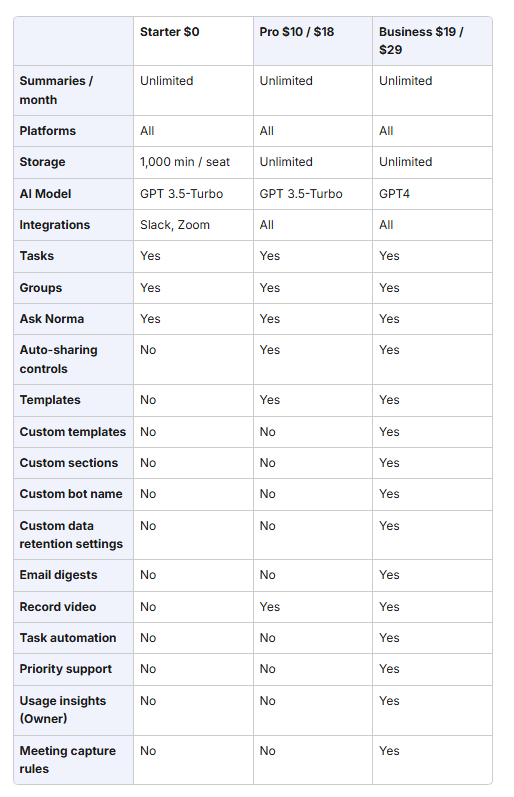
There are three packages Supernormal offer. First one is Starter which is free. The Second one is Pro where you can enjoy all the features however you will need to rely GPT 3.5 Turbo and you will not have access to custom templates and some other important features. The last one is Business where all the features are unlocked and it also support GPT4 (AI Model).
Here is the pricing wise specs comparison of Supernormal.
Supernormal Reviews
We have gone through various platforms including but not limited to G2 and Chrome Web Store and found a clear pattern.
People choose Supernormal for the privacy of a bot-less experience. However, they struggle for the quality of the summaries. If you are running a global team (that include non-native English accents), be prepared to do a 5-minute ‘sanity check’ on your transcripts.
Otter.ai AI Notetaker: Specs & Pricing
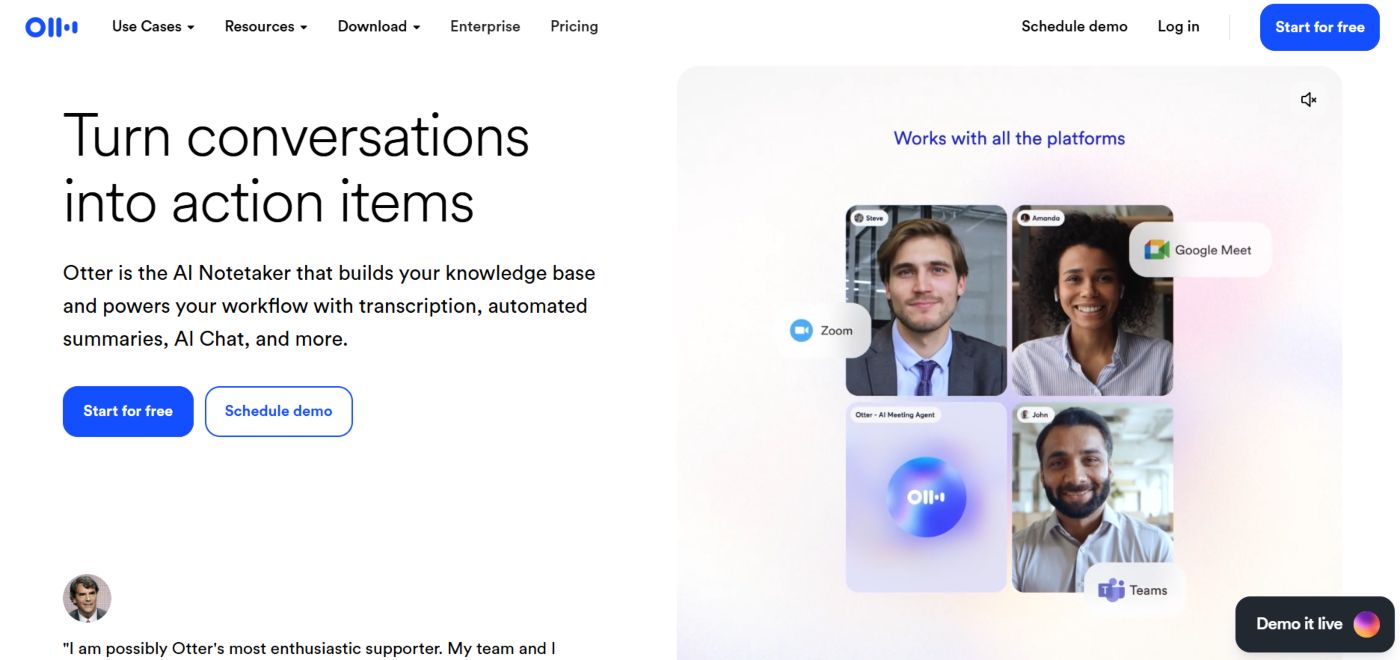
In 2026, Otter.ai remains the industry leader for real time transcription. Its core feature is the OtterPilot, an AI assistant that joins your Zoom, Teams and Google Meet calls to transcribe live, capture slides automatically and generate a summary.
It is best for journalists, students and high-volume meeting cultures where ‘searchability’ across months of conversations is key.
Here are keep specs of Otter.ai:
- Recording Method: Otter.ai primarily uses the OtterPilot bot (visible participant unlike Supernormal). It also has the best-in-class mobile app for recording in-person meetings.
- Real time Intelligence: One of the best thing about Otter.ai is that it features a live, scrolling transcript and Otter AI Chat, which lets you ask questions during the meeting (for instance, what was the budget mentioned?)
- Language Support: Unlike Supernormal, it only support English (multiple accents) and limited support for Spanish and French.
- Storage: It offers cloud-based storage with massive history limits on paid plans.
- Integrations: It also supports Slack, Salesforce, HubSpot, and Dropbox.
What I like About Otter.ai (Pros)
Live Transcription
You can literally watch the words appear on the screen with a 1-2 second delay. It is great for those who need to highlight key moments while they happen.
Search Everything
It is incredibly powerful tool when it comes to search. You can search for a keyword across 500 different meetings and find every exact timestamp instantly.
In-Person Performance
If you go to a physical conference or coffee meeting, Otter’s mobile app is significantly more stable and accurate than Supernormal.
Automated Slide Capture
If someone shares there screen in Zoom, OtherPilot automatically snaps a screenshot of the slide and inserts it into the notes.
What I Don’t like About Otter.ai (Cons)
The Bot Visibility
Unlink Supernormal, you almost always have an OtterPilot bot visible in the meeting room, which can be awkward sometimes.
Aggressive Restrictions
The free and pro plans have strict minutes per conversation caps. If your meeting goes over 90 minutes on Pro, it just stops recording.
English-Centric
If you have a global team i.e. speaking German, Urdu / Hindi, or Chinese Mandarin, Otter is virtually useless compared to Supernormal as it only support English language.
Manual Cleanup Required
It records every sound during meeting like “um” or “uh”, the raw transcript is often messy and requires more editing than Supernormal’s polished summaries.
Otter.ai Pricing
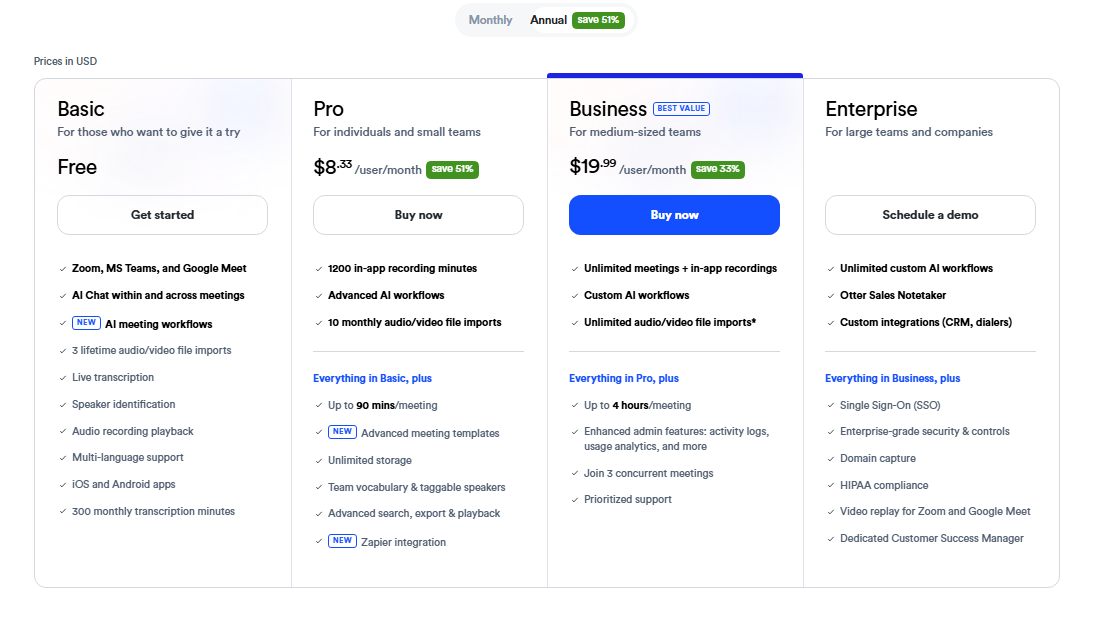
They have four pricing levels i.e. Basic (free one), Pro (for individuals & small teams), Business (for medium-sized teams) and Enterprise (for larger teams and companies).
You can choose the package as per your requirements and features you need.
Otter.ai Reviews
We have gone through various 3rd party platforms like G2, Google Chrome Store and Trust Pilot and found trusted reviews from customers.
We found that Otter.ai holds a high customers’ rating across various platforms however some customers on Trust pilot highlights about billing and aggressive bot behavior.
Our final verdict is that if you choose Otter, double check your ‘Auto-Join’ settings immediately after signup and keep a close eye on your subscription renewal dates to avoid billing headaches.
Final Verdict: Supernormal Vs Otter.ai
Choose Supernormal, if you prioritize privacy over pricing, want perfectly formatted and bot-free notes / summaries for clients and global teams. However
However, if you are on a tight budget, need real-time English transcription, a powerful mobile app for in-person meetings and the ability to search through an extensive archive of past conversations, go with Otter.ai.
Frequently Asked Questions (FAQs)
Can I Use Both Supernormal and Otter.ai for Free?
Yes, both offers free tiers but with different limits.
Otter.ai gives you 300 minutes per month (capped at 30 minutes per meeting), whereas Supernormal typically offers Start plan that allows you to test their high-end templates on a limited number of meetings rather than just counting minutes.
Which Tool (Supernormal vs Otter.ai) is better for non-English speakers?
Supernormal is a clear winner here. It supports up to 60 languages with high accuracy. On the other side, Otter.ai, only supports English and limited support to Spanish and French.
Will these tools automatically update my CRM?
Yes, but you usually have to pay for it. Both tools offer integrations with HubSpot and Salesforce. But these are typically locked behind their Business or Enterprise tiers (approximately $20 to $30 per user / month).
Which one is safe for confidential business data?
Both tools claim that they are SOC 2 Type II compliant and use AES-256 encryption. However, Supernormal is often favored by privacy-conscious teams because it allows for recording without an external bot joining the call, reducing the creepy factor during sensitive one on one conversations.
Read More:
- Fireflies Vs Otter.ai
- Fathom Vs Supernormal
- How to Sync Al Meeting Notes With CRMs like HubSpot / Salesforces?
